Blog·Motion

How to make cool motion design videos

I made a 44-second launch video for Sharpy in about four hours, with Claude Code and Codex doing the work. Here's how, shot by shot, plus the free harness that sets your agent up to do the same.

I made this 44-second launch video for my startup, Sharpy, in about four hours. Four hours on top of half a year of playing with agents and building my tools. The tools are what I’m giving you here, for free.

The final cut. Sound on.

I rebuilt the list in React for this concept film. The blue Mac screen is a placeholder for real app footage.

Sharpy is in early access. Join the waitlist and we’ll email you an invite.

I’m not a designer, and I’m not that creative. I love design, that’s it. And I keep seeing founders ask an agent for a launch video and get total shit back. You have to give the agent references and tools, then judge what it makes.

I wanted to show another founder how I make these. I recorded the whole thing as a voice note, explaining it like you’re sitting next to me, and then cut it into this post. The installation prompt below gives your agent the tools.

The shortcut: my harness

Start with the kit, then use the shot-by-shot breakdown to direct your own film.

A harness is the folder your agent works in: instructions, tools, libraries, presets and references, already set up. Open Claude Code or Codex in that folder and the agent knows how to make a launch video.

I extracted the reusable parts of my toolkit into launchfilm, a free open-source repo. Paste this prompt into your agent and it installs everything:

Fetch and follow https://raw.githubusercontent.com/evgenspm/launchfilm/v0.1.0/INSTALL.md

Browse the 202 reference recipes on GitHub. Each has a beat sheet, motion measurements and a link to the original. Eleven include starter code; your agent builds the others from the written breakdown.

The kit is MIT. Remotion has its own license, including a company license requirement for larger teams. The default voice, music and sound effects need no API keys.

Your agent makes AI slop

Ask an agent for a launch video and you get cards that pop in and pop out. Low detail, dumb motion, one speed, no sound effects. Normal people on X spot AI slop in a second and keep scrolling. You can rewrite your prompt all day and it won’t get better, because the agent doesn’t have the right tools.

Three things fix it: references and taste (that’s on you), tools (that’s the harness), and iterations (you watching every transition).

The video is just code

I use Remotion. It takes React components and renders them into video, frame by frame. So making a video turns into writing code, which is the thing agents are best at. The agent can jump to any frame, see what’s on screen and change it. Every edit is one message and a re-render. You never touch the code. You watch the render and say what to change.

Taste comes from references

Find great references and give them to your agent. It goes through them frame by frame and learns which transition they used, when, and how to rebuild it. It records frame counts, scale and blur values. You don’t need to understand them, the agent does: “a notification flies in from the camera in 7 frames, scale 1.47 → 1, blur 8 → 0 px” is the kind of thing it pulls out and reuses. That’s my whole secret, and the harness ships with a library of references already broken down like this.

Where I’d look for your own:

  • X. There are tons of great launch videos there. Ask Grok to find them for you.
  • Reels from motion designers who work in After Effects. That’s a different level from a normal launch video.
  • Work from top design studios.

Taste is the part you bring. Once you have it, describe what you see in your head, even if it sounds crazy. With the right tools the agent can build it. My best moment, the explosion below, started as “stop time like Quicksilver in X-Men”.

The rules I took from them

  • Everything moves, all the time. Attention spans are tiny now. Hook people in the first second, then keep something changing.
  • One shot flows into the next. The wow moment happens when one frame melts into another. Cut, cut, cut looks cheap.
  • Go abstract and 3D: a glowing sphere, logos flying through space, a camera that moves in depth. Flat cards on black look like a slideshow.
  • Change the pace on purpose. Some shots fast, some sharp, some very slow.

Build the whole story around these.

Write the story before the shots

Launch videos are hard. They’re short, and the story has to land anyway. I asked Claude to write the script. It has access to my product, the repo and the code, so it knows what Sharpy does. The first script was raw and kind of dumb. I liked the concept, so I stuck with it and reworked the rest.

The concept: your day comes at you in pieces, spread across every app. You try to keep a to-do list by hand, and two hours later it’s already wrong. That’s the whole problem. Sharpy collects the pieces and keeps one list current.

Do it in this order: script, voice, music, then picture. The timing of the words becomes your edit. Claude wrote the lines. Gemini TTS turned them into a voice, and I picked the voice by ear, because I wanted to judge the delivery myself. Lyria made the music, and the agent shifted it so the beat drop lands right when the list appears.

My 44 seconds, shot by shot

You don’t have much time, so you need to show a lot fast. Here’s every beat and why it’s there.

0–4 s. The hook. A pile of notifications falls in, way more than normal. Then a weird blur, everything spins, and bam, a white frame hits you in the eyes. Everything before that white frame is the hook. Meanwhile the voice says “Your day comes at you in pieces.” That’s the problem: your day is scattered across apps.

0 to 4 s: the hook.

The spin is a shader I made earlier for my old landing page: zoom into one point, every frame drawn over the previous one slightly bigger and rotated, then a blowout to white. The scene swaps inside the white, so you never see a cut.

4–8 s. Boring on purpose. After the white frame someone types a task into a to-do list. Slow and dull. Then the clock jumps two hours with a loud, annoying tape-rewind sound, and the list is wrong.

8–10 s. The explosion. This is the wow moment that breaks the frame. The ordinary list window bursts into pieces, and you see all the meat in detail. Then time stops for a moment, a freeze frame, so the viewer sits there like “wtf”. Then everything snaps back into one sphere.

The boring list, the +2h rewind, the explosion, the freeze, the sphere.

The first version was slow and ugly. I told Codex: blast from the middle, chunks and dust at different depths, then stop time like Quicksilver in X-Men, then bam, back into the sphere. It came back as 9 frames out, 7 frames frozen, 9 frames back.

That’s where I saw my chance to keep it one continuous shot: the debris turns into the sphere, and the sphere is the product in one picture. I took it from an open-source orb editor (lersent001.github.io/orb). Go look, there are great references there.
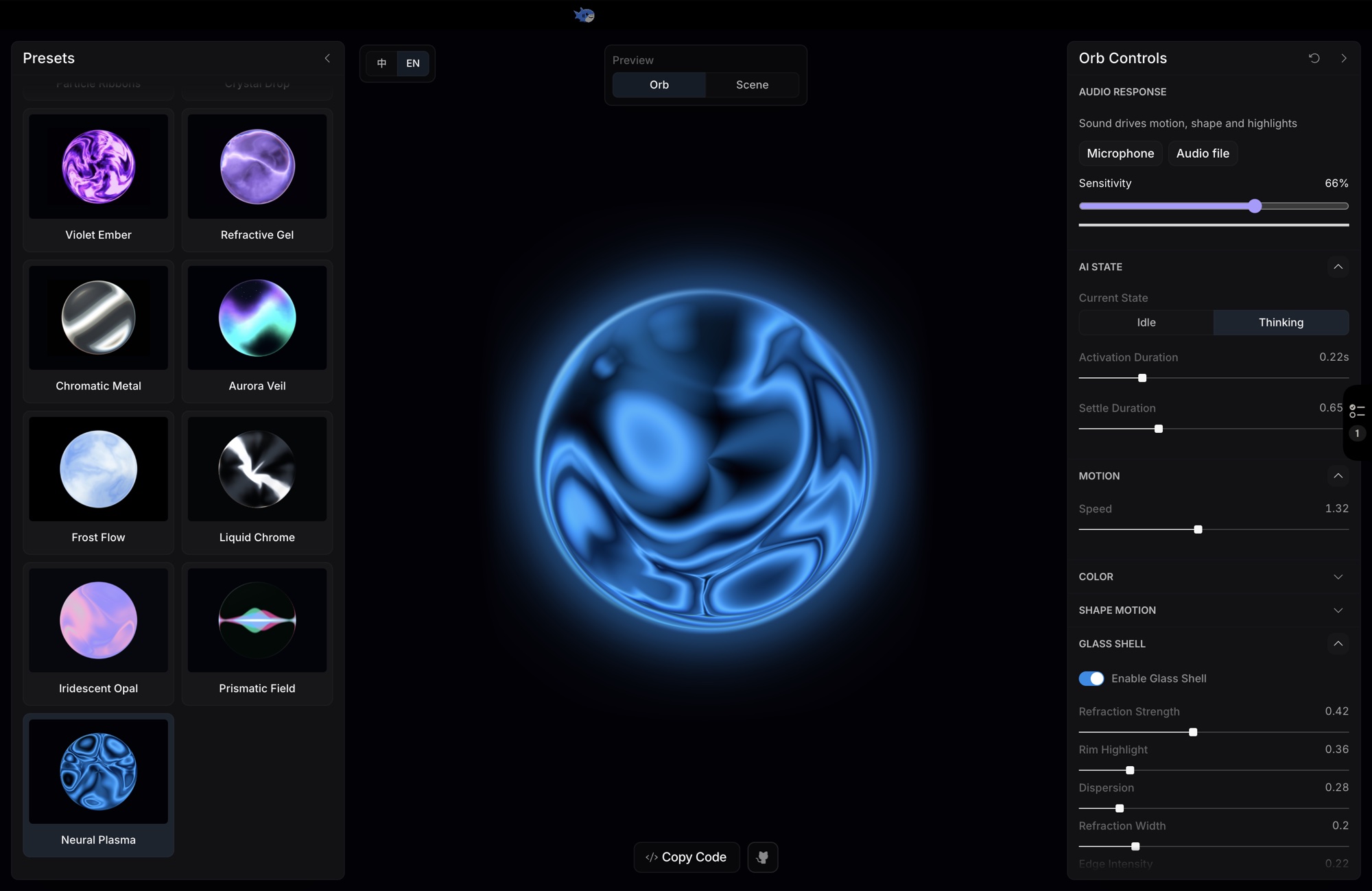
The orb editor with the Neural Plasma preset selected: a glowing cyan sphere on black, with the preset list on the left.
The orb editor where I found the sphere: the Neural Plasma preset, before we recolored it to Sharpy blue.

10–15 s. What Sharpy does. It pulls your messages, mail, calls and screen into one place. The app logos fly into the sphere and the sphere reacts to each one.

15–17 s. Sphere to Mac. I needed to get from the sphere to a Mac with the list. It’s a simple zoom in, zoom out, but it reads as one shot. We zoom into the round sphere, come out of the round webcam, pull back, and the Mac is open. The picture stays interesting the whole time.

Into the sphere, out of the webcam.

17–29 s. The list lives through a day. A notification flies in and turns into a task. When something gets done and Sharpy sees it, it crosses the task off itself. When it can’t know, it asks before dropping it. The clock keeps spinning with that loud rewind sound, on purpose, so it never gets boring.

A message turns into a task, a merged PR checks itself off.

29–35 s. One task, then the recap. The camera zooms into the notch on the Mac, where your one task for right now sits. That’s the link to the real product: on your Mac you see the task to focus on. The island grows into a full black frame. “One list. Always current.” Then a quick Apple-style recap of where it gets its context from.

The notch island grows into the black frame for "One list."

35–44 s. The ending. The music cuts. “You”, with the sphere inside the O. We zoom through it like a peephole and the Sharpy logo appears on the other side. “It starts with understanding you.” Then the end card with the link. That line is our long-term vision: understand the user’s context. Everything starts there, with how well we handle your context. I’ll close every Sharpy video like this once we have the UI.

The ending: "You", the peephole, the logo.

One prompt is never enough

None of this came out of one prompt. My loop:

  1. Give Claude your product (docs, repo, site) and ask for a concept and a script. You approve the story. Skip the picture for now. Story and engagement first.
  2. Claude rough-cuts the whole film in one go. Mine took about an hour. Rough as hell, but the rhythm was right.
  3. Then you go through every transition and every frame by hand. More detail, more effects, more stuff happening around, more depth in every small element.
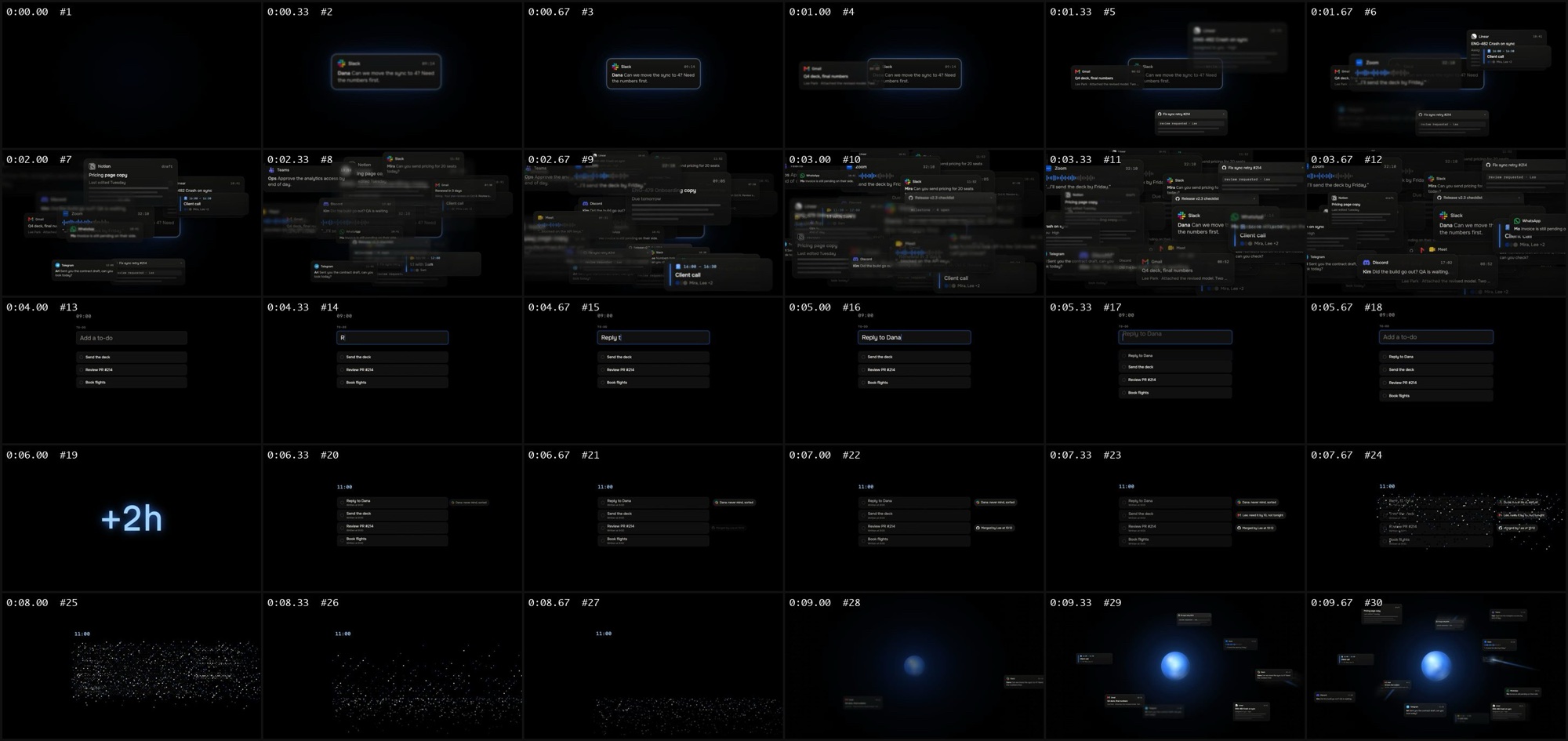
A grid of small frames from the first rough cut, three per second, read left to right.
My first full cut (v0) the way the agent sees it: a contact sheet, three frames per second.

For step 3 I switched to Codex. I dictated my notes the way they came out: “messages fall from every side, faster and faster, fwoosh, zoom in, bam, the list”. Codex turned them into a brief with a pass criterion for every scene. It tested each transition on its own first and built me a review page with every transition as a separate clip, plus a 0.5× button. I gave notes, it re-rendered four seconds instead of the whole film. Two rounds of that, then the full film.

Then one more round for X, where everyone scrolls with the sound off: captions, a barely visible grid in the background for depth, the Mac moved to the right, and 3D type for “One list. Always current.”

Stuff that saved me hours

  • One shot flows into the next. Hard cut only where it means something. I have exactly one: the music cuts at 35 s and “You” appears in silence.
  • Sound on every event: a ping for a notification, a tick for a checkbox, a whoosh on a move. And use silence.
  • Your agent watches through contact sheets, frames laid out on a grid. Make it look at its own frames, and ask it what it didn’t check.
  • Drive everything from the frame number. Anything that runs on a real clock gives you different frames on every render.
  • Measure references with scripts. Vision models misread camera moves.
  • Real logos only. Never redraw, rotate or recolor someone else’s logo.
  • Every time the agent improves something, it goes back into the harness. The next video starts better.

I baked all of this into the harness, so your agent follows it without you asking.

What I used

  • Remotion for the video, three.js for the 3D
  • Claude Code (Opus 5.5): concept, script, the first full cut
  • Codex: every transition, the polish, the checks
  • Gemini TTS for the voice, Lyria for the music
  • Grok for a second opinion on the pipeline
  • Orb by LerSent001 for the sphere, MacBook Pro 14-inch M5 by Apple User for the laptop

If you make something with the harness, tag me on X or LinkedIn, @evgenspm. I want to see it.

Sharpy: getsharpy.com

# How to make cool motion design videos

> I made a 44-second launch video for Sharpy in about four hours, with Claude Code and Codex doing the work. Here's how, shot by shot, plus the free harness that sets your agent up to do the same.

Motion · By Eugene Li · October 17, 2026 · 9 min read · https://eugenefounder.lol/blog/how-to-make-cool-motion-design-videos/

I made this 44-second launch video for my startup, [Sharpy](https://getsharpy.com/?ref=eugenefounder&utm_source=eugenefounder&utm_medium=blog&utm_campaign=motion-design&utm_content=intro), in about four hours. Four hours on top of half a year of playing with agents and building my tools. The tools are what I'm giving you here, for free.

<figure>
  <video controls playsinline preload="metadata" poster="/img/motion-design/sharpy-final-web-poster.jpg" src="/video/motion-design/sharpy-final-web.mp4"></video>
  <figcaption>The final cut. Sound on.</figcaption>
</figure>

I rebuilt the list in React for this concept film. The blue Mac screen is a placeholder for real app footage.

Sharpy is in early access. [Join the waitlist](https://getsharpy.com/waitlist?ref=eugenefounder&utm_source=eugenefounder&utm_medium=blog&utm_campaign=motion-design&utm_content=video) and we'll email you an invite.

I'm not a designer, and I'm not that creative. I love design, that's it. And I keep seeing founders ask an agent for a launch video and get total shit back. You have to give the agent references and tools, then judge what it makes.

I wanted to show another founder how I make these. I recorded the whole thing as a voice note, explaining it like you're sitting next to me, and then cut it into this post. The installation prompt below gives your agent the tools.

## The shortcut: my harness

Start with the kit, then use the shot-by-shot breakdown to direct your own film.

A harness is the folder your agent works in: instructions, tools, libraries, presets and references, already set up. Open Claude Code or Codex in that folder and the agent knows how to make a launch video.

I extracted the reusable parts of my toolkit into [launchfilm](https://github.com/evgenspm/launchfilm), a free open-source repo. Paste this prompt into your agent and it installs everything:

```text
Fetch and follow https://raw.githubusercontent.com/evgenspm/launchfilm/v0.1.0/INSTALL.md
```

Browse the [202 reference recipes on GitHub](https://github.com/evgenspm/launchfilm/blob/v0.1.0/recipes/CATALOG.md). Each has a beat sheet, motion measurements and a link to the original. Eleven include starter code; your agent builds the others from the written breakdown.

The kit is MIT. Remotion has its own [license](https://www.remotion.dev/license), including a company license requirement for larger teams. The default voice, music and sound effects need no API keys.

## Your agent makes AI slop

Ask an agent for a launch video and you get cards that pop in and pop out. Low detail, dumb motion, one speed, no sound effects. Normal people on X spot AI slop in a second and keep scrolling. You can rewrite your prompt all day and it won't get better, because the agent doesn't have the right tools.

Three things fix it: references and taste (that's on you), tools (that's the harness), and iterations (you watching every transition).

## The video is just code

I use Remotion. It takes React components and renders them into video, frame by frame. So making a video turns into writing code, which is the thing agents are best at. The agent can jump to any frame, see what's on screen and change it. Every edit is one message and a re-render. You never touch the code. You watch the render and say what to change.

## Taste comes from references

Find great references and give them to your agent. It goes through them frame by frame and learns which transition they used, when, and how to rebuild it. It records frame counts, scale and blur values. You don't need to understand them, the agent does: "a notification flies in from the camera in 7 frames, scale 1.47 → 1, blur 8 → 0 px" is the kind of thing it pulls out and reuses. That's my whole secret, and the harness ships with a library of references already broken down like this.

Where I'd look for your own:

- X. There are tons of great launch videos there. Ask Grok to find them for you.
- Reels from motion designers who work in After Effects. That's a different level from a normal launch video.
- Work from top design studios.

Taste is the part you bring. Once you have it, describe what you see in your head, even if it sounds crazy. With the right tools the agent can build it. My best moment, the explosion below, started as "stop time like Quicksilver in X-Men".

## The rules I took from them

- Everything moves, all the time. Attention spans are tiny now. Hook people in the first second, then keep something changing.
- One shot flows into the next. The wow moment happens when one frame melts into another. Cut, cut, cut looks cheap.
- Go abstract and 3D: a glowing sphere, logos flying through space, a camera that moves in depth. Flat cards on black look like a slideshow.
- Change the pace on purpose. Some shots fast, some sharp, some very slow.

Build the whole story around these.

## Write the story before the shots

Launch videos are hard. They're short, and the story has to land anyway. I asked Claude to write the script. It has access to my product, the repo and the code, so it knows what Sharpy does. The first script was raw and kind of dumb. I liked the concept, so I stuck with it and reworked the rest.

The concept: your day comes at you in pieces, spread across every app. You try to keep a to-do list by hand, and two hours later it's already wrong. That's the whole problem. Sharpy collects the pieces and keeps one list current.

Do it in this order: script, voice, music, then picture. The timing of the words becomes your edit. Claude wrote the lines. Gemini TTS turned them into a voice, and I picked the voice by ear, because I wanted to judge the delivery myself. Lyria made the music, and the agent shifted it so the beat drop lands right when the list appears.

## My 44 seconds, shot by shot

You don't have much time, so you need to show a lot fast. Here's every beat and why it's there.

**0–4 s. The hook.** A pile of notifications falls in, way more than normal. Then a weird blur, everything spins, and bam, a white frame hits you in the eyes. Everything before that white frame is the hook. Meanwhile the voice says "Your day comes at you in pieces." That's the problem: your day is scattered across apps.

<figure>
  <video controls playsinline preload="none" poster="/img/motion-design/clip-1-hook-poster.jpg" src="/video/motion-design/clip-1-hook.mp4"></video>
  <figcaption>0 to 4 s: the hook.</figcaption>
</figure>

The spin is a shader I made earlier for my old landing page: zoom into one point, every frame drawn over the previous one slightly bigger and rotated, then a blowout to white. The scene swaps inside the white, so you never see a cut.

**4–8 s. Boring on purpose.** After the white frame someone types a task into a to-do list. Slow and dull. Then the clock jumps two hours with a loud, annoying tape-rewind sound, and the list is wrong.

**8–10 s. The explosion.** This is the wow moment that breaks the frame. The ordinary list window bursts into pieces, and you see all the meat in detail. Then time stops for a moment, a freeze frame, so the viewer sits there like "wtf". Then everything snaps back into one sphere.

<figure>
  <video controls playsinline preload="none" poster="/img/motion-design/clip-2-explosion-poster.jpg" src="/video/motion-design/clip-2-explosion.mp4"></video>
  <figcaption>The boring list, the +2h rewind, the explosion, the freeze, the sphere.</figcaption>
</figure>

The first version was slow and ugly. I told Codex: blast from the middle, chunks and dust at different depths, then stop time like Quicksilver in X-Men, then bam, back into the sphere. It came back as 9 frames out, 7 frames frozen, 9 frames back.

That's where I saw my chance to keep it one continuous shot: the debris turns into the sphere, and the sphere is the product in one picture. I took it from an open-source orb editor ([lersent001.github.io/orb](https://lersent001.github.io/orb)). Go look, there are great references there.

<figure>
  <img src="/img/motion-design/orb-reference.jpg" alt="The orb editor with the Neural Plasma preset selected: a glowing cyan sphere on black, with the preset list on the left." />
  <figcaption>The orb editor where I found the sphere: the Neural Plasma preset, before we recolored it to Sharpy blue.</figcaption>
</figure>

**10–15 s. What Sharpy does.** It pulls your messages, mail, calls and screen into one place. The app logos fly into the sphere and the sphere reacts to each one.

**15–17 s. Sphere to Mac.** I needed to get from the sphere to a Mac with the list. It's a simple zoom in, zoom out, but it reads as one shot. We zoom into the round sphere, come out of the round webcam, pull back, and the Mac is open. The picture stays interesting the whole time.

<figure>
  <video controls playsinline preload="none" poster="/img/motion-design/clip-3-sphere-mac-poster.jpg" src="/video/motion-design/clip-3-sphere-mac.mp4"></video>
  <figcaption>Into the sphere, out of the webcam.</figcaption>
</figure>

**17–29 s. The list lives through a day.** A notification flies in and turns into a task. When something gets done and Sharpy sees it, it crosses the task off itself. When it can't know, it asks before dropping it. The clock keeps spinning with that loud rewind sound, on purpose, so it never gets boring.

<figure>
  <video controls playsinline preload="none" poster="/img/motion-design/clip-4-list-poster.jpg" src="/video/motion-design/clip-4-list.mp4"></video>
  <figcaption>A message turns into a task, a merged PR checks itself off.</figcaption>
</figure>

**29–35 s. One task, then the recap.** The camera zooms into the notch on the Mac, where your one task for right now sits. That's the link to the real product: on your Mac you see the task to focus on. The island grows into a full black frame. "One list. Always current." Then a quick Apple-style recap of where it gets its context from.

<figure>
  <video controls playsinline preload="none" poster="/img/motion-design/clip-5-island-poster.jpg" src="/video/motion-design/clip-5-island.mp4"></video>
  <figcaption>The notch island grows into the black frame for "One list."</figcaption>
</figure>

**35–44 s. The ending.** The music cuts. "You", with the sphere inside the O. We zoom through it like a peephole and the Sharpy logo appears on the other side. "It starts with understanding you." Then the end card with the link. That line is our long-term vision: understand the user's context. Everything starts there, with how well we handle your context. I'll close every Sharpy video like this once we have the UI.

<figure>
  <video controls playsinline preload="none" poster="/img/motion-design/clip-6-ending-poster.jpg" src="/video/motion-design/clip-6-ending.mp4"></video>
  <figcaption>The ending: "You", the peephole, the logo.</figcaption>
</figure>

## One prompt is never enough

None of this came out of one prompt. My loop:

1. Give Claude your product (docs, repo, site) and ask for a concept and a script. You approve the story. Skip the picture for now. Story and engagement first.
2. Claude rough-cuts the whole film in one go. Mine took about an hour. Rough as hell, but the rhythm was right.
3. Then you go through every transition and every frame by hand. More detail, more effects, more stuff happening around, more depth in every small element.

<figure>
  <img src="/img/motion-design/v0-contact-sheet.jpg" alt="A grid of small frames from the first rough cut, three per second, read left to right." />
  <figcaption>My first full cut (v0) the way the agent sees it: a contact sheet, three frames per second.</figcaption>
</figure>

For step 3 I switched to Codex. I dictated my notes the way they came out: "messages fall from every side, faster and faster, fwoosh, zoom in, bam, the list". Codex turned them into a brief with a pass criterion for every scene. It tested each transition on its own first and built me a review page with every transition as a separate clip, plus a 0.5× button. I gave notes, it re-rendered four seconds instead of the whole film. Two rounds of that, then the full film.

Then one more round for X, where everyone scrolls with the sound off: captions, a barely visible grid in the background for depth, the Mac moved to the right, and 3D type for "One list. Always current."

## Stuff that saved me hours

- One shot flows into the next. Hard cut only where it means something. I have exactly one: the music cuts at 35 s and "You" appears in silence.
- Sound on every event: a ping for a notification, a tick for a checkbox, a whoosh on a move. And use silence.
- Your agent watches through contact sheets, frames laid out on a grid. Make it look at its own frames, and ask it what it didn't check.
- Drive everything from the frame number. Anything that runs on a real clock gives you different frames on every render.
- Measure references with scripts. Vision models misread camera moves.
- Real logos only. Never redraw, rotate or recolor someone else's logo.
- Every time the agent improves something, it goes back into the harness. The next video starts better.

I baked all of this into the harness, so your agent follows it without you asking.

## What I used

- Remotion for the video, three.js for the 3D
- Claude Code (Opus 5.5): concept, script, the first full cut
- Codex: every transition, the polish, the checks
- Gemini TTS for the voice, Lyria for the music
- Grok for a second opinion on the pipeline
- [Orb by LerSent001](https://github.com/LerSent001/orb) for the sphere, [MacBook Pro 14-inch M5 by Apple User](https://sketchfab.com/3d-models/macbook-pro-14-inch-m5-652a992f4f244122ae251f9cbb81da1e) for the laptop

If you make something with the harness, tag me on [X](https://x.com/evgenspm) or [LinkedIn](https://www.linkedin.com/in/evgenspm), @evgenspm. I want to see it.

Sharpy: [getsharpy.com](https://getsharpy.com/?ref=eugenefounder&utm_source=eugenefounder&utm_medium=blog&utm_campaign=motion-design&utm_content=footer)